Locket Widget
- 4.6
- Rating
- 10.00M
- Installs
- Free
- Price

 Analysis by App-foxy
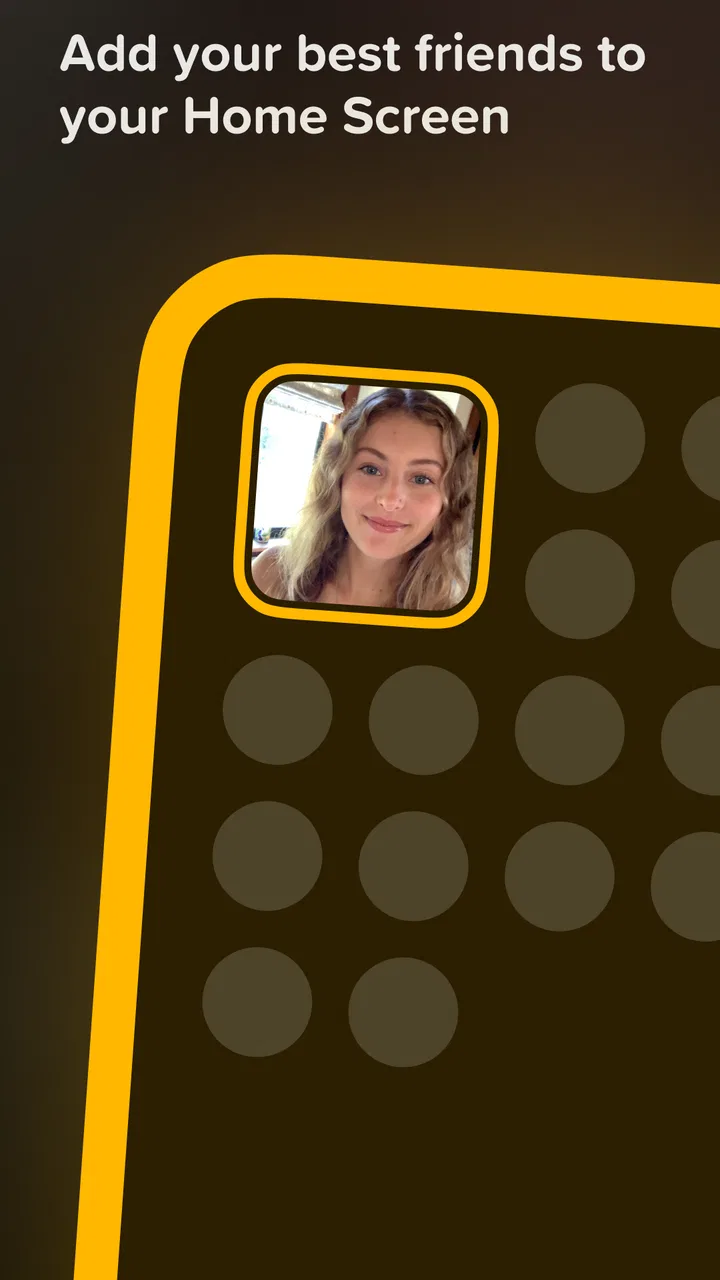
Some social apps ask for your attention, while Locket Widget tries to occupy a much smaller space: the place where you already glance at your phone. I found that difference important during my first week with it. Instead of opening a feed and deciding whether I wanted to browse, I could see a recent picture from a friend directly through the widget. That makes the app feel less like another destination and more like a small, recurring reminder of people I actually know.
Locket Widget is a free social app from Locket Labs, Inc., built around sharing live pictures with selected friends. It is aimed at teenagers and adults who want a lightweight way to stay visually connected without maintaining a public profile. The app has a 4.6 average from around 349 thousand ratings, and its 10 million-plus installs suggest that the simple idea has reached a substantial audience. My main question, though, was not whether it was charming at first. It was whether the charm survived after the novelty of putting photos on a home screen wore off.
What makes the first week feel different
The initial appeal comes from the restriction. Locket is not trying to become a replacement for every social network. Its central experience is focused on pictures from friends you choose, which immediately changes how I think about posting. A photo does not need to be polished enough for a public feed, and I do not have to prepare a caption that explains the moment to a large audience. A quick image from a walk, a meal, a commute, or a quiet afternoon can be enough.
You May Also Like

 Blood Strike: 2.5 Anniversary
Blood Strike’s Loadouts Turn Every Drop Into a Tactical Gamble
A close look at Blood Strike’s custom loadouts: how fast access to signature weapons reshapes its battle royale rhythm, rewards preparation, and narrows the gap between fights.

 Pandora - Music & Podcasts
Pandora’s Music Is Easy to Start, but Harder to Recover
Pandora’s strength is its low-effort path from a seed to a station. Its weak spot is how much confidence it asks you to place in connection, setup, and quiet recovery.

 8 Ball Pool
 Is Built on Rivalries, Rematches, and Routine
A close look at the rivalries, rematches, shared routines, and unanswered safety questions that turn a quick pool match into a persistent mobile community.

 Samsung Music
’s Quiet Strength Is Playing What You Already Own
Its reach comes less from spectacle than from dependable access to a personal library. That simplicity is both the app’s strongest retention engine and its ceiling.

 AccuWeather: Weather Radar
AccuWeather Review: A Quick, Clear Forecast for Everyday Decisions
For everyday plans, the best forecast is the one you can understand quickly. AccuWeather makes rain timing, radar, and local conditions easy to act on, with a few trade-offs.

 Hill Climb Racing
Why Hill Climb Racing Still Turns Crashes Into One More Run
A tiny car, a bumpy hill and one more upgrade: Hill Climb Racing keeps resurfacing because its simple chaos makes every near-miss feel personal.
More From Our News Desk



That smaller audience is the app’s strongest emotional advantage. On a typical social platform, even a private account can feel performative because the surrounding design encourages reactions, browsing, and comparison. Here, the home-screen placement makes the interaction feel closer to a visual check-in. I found myself noticing ordinary moments that would otherwise never become messages. The photo does not need to be important; it only needs to make sense to the people receiving it.
The widget also changes the rhythm of communication. Messaging apps are excellent when I want to start a conversation, but they require me to open a thread and decide what to say. Locket lowers that barrier. A picture can silently communicate “this is what my day looks like” without demanding a reply. That is useful for close friends who enjoy staying present in one another’s routines but do not want a constant stream of typed updates.
Setting up the habit is easiest with a small, active group. If I add people who rarely use the app, the home-screen experience quickly becomes less interesting. The best early result comes when friends agree to use it for the same kind of casual sharing rather than treating it as a one-time novelty. It works particularly well for a group separated by school, work, travel, or different daily schedules, because the widget creates a low-effort sense of proximity.
One practical detail matters more than it first appears: the app is only as useful as the place where the widget is visible. If it is buried on a secondary screen, I lose the main benefit and start treating Locket like an ordinary app. I would put it somewhere I naturally look, but not in a position that makes the phone feel visually cluttered. That placement decision is part of the setup, not an afterthought.
The first-week experience is also helped by the absence of pressure to produce perfect content. I could use the camera for an immediate snapshot instead of collecting images for later. That makes the app feel more spontaneous than a conventional photo-sharing service. The trade-off is that spontaneous images are sometimes uninteresting, poorly framed, or repetitive. The app’s appeal depends on accepting that imperfection rather than expecting every update to feel meaningful.
Who benefits most from the smaller audience
I would recommend it first to close-knit groups rather than broad social circles. Families, long-distance partners, roommates who move away, and friends who share an inside joke can get more from it than someone looking for public discovery. The limited audience gives everyday pictures context. A photo of a familiar street or a half-finished snack may be forgettable to strangers but genuinely pleasant to someone who knows the person behind it.
It is also a good fit for people who dislike the obligation built into group chats. In a chat, a message can create a visible expectation of response. With Locket, the exchange can remain quiet. I can look at a friend’s picture, enjoy the connection, and continue with my day. That makes it suitable for relationships where people care about each other but do not have the time or energy for continuous conversation.
On the other hand, I would skip it if my main goal is meeting new people, building an audience, organizing discussions, or keeping a searchable archive of photographs. The app’s focused design is a strength for intimate sharing, but it is not a substitute for a public photo community, a messaging workspace, or a proper cloud album. Choosing it means accepting that the social value comes from existing relationships.
Does it still earn a place after the novelty fades?
I look at its staying power through the routines people actually keep, rather than the excitement of a new widget. That also raises a practical question: whether the experience feels comfortable across different ways of seeing, touching, and using a phone. For me, the answer depends as much on where the widget sits and how often someone wants to check it as on the app itself.
Month-to-month value depends on real routines
After the first burst of experimentation, the app becomes less about discovering what it can do and more about whether my friends continue using it. That is the central long-term test. A home-screen photo is delightful when it arrives from someone I genuinely want to hear from. It becomes background decoration when the group stops posting or when the same few people carry the entire exchange.
I found the most sustainable routine was to treat it as a visual postcard rather than a daily obligation. The moment the group turns posting into a quota, the app loses its relaxed character. People begin sending pictures merely to maintain activity, and the updates feel less personal. A better approach is to share when something naturally catches the eye: an unexpectedly good lunch, a change in weather, a pet doing something strange, or a small detail that connects to a previous conversation.
That distinction separates recurring value from novelty. The app does not need to deliver a dramatic event every time. It needs to make small contact easy enough that it survives busy weeks. I think it succeeds when the group uses it as a background thread of shared life, not as a social performance that requires planning.
A realistic example is a group of former roommates who now live in different cities. A group chat might be reserved for practical messages, while Locket can carry the small visual updates that would otherwise be lost. One person sends a rainy commute, another shares a new desk setup, and a third posts a familiar meal. Nobody needs to answer immediately, but everyone gets a glimpse of the others’ day. That is a modest benefit, yet it can be more durable than a burst of intense conversation.
The same pattern can work for family members with different schedules. A parent may not want to interrupt a child during school, and a sibling may not want to start a full conversation while working. A quick picture gives them a way to remain present without turning every interaction into a call or a long exchange. The value is not in the technical act of posting; it is in reducing the effort needed to maintain closeness.
For couples, the experience can be sweet but requires more care. If both people enjoy spontaneous glimpses, the widget can feel intimate. If one person interprets every missing update as a sign of disinterest, the same design can create pressure. I would establish expectations early: the app should support connection, not become a test of availability. That is an important social trade-off that no widget can solve on its own.
The maintenance burden is low, but not zero
Compared with a conventional social feed, Locket asks for less ongoing management. There is no need to curate a public identity, write elaborate posts, or keep up with a large network. That simplicity is a genuine advantage. I can return after a busy period without feeling that I have fallen behind on hundreds of updates.
Still, the app needs occasional attention to remain useful. The first task is keeping the friend group intentional. Adding too many people can dilute the feeling of a private visual circle, while keeping inactive contacts indefinitely can make the widget look stale. I would periodically consider whether each connection still adds something. This is not a frequent chore, but it is the difference between a meaningful widget and a random collage.
The second task is managing the quality of the habit. If I notice that posting has become automatic, I would pause rather than force it. A short break can be healthier than turning the app into another daily streak. The product works best when the content feels chosen in the moment, even if the choice takes only a few seconds.
There is also a practical maintenance question around device support. The listed minimum operating system is Android 8.1, so compatibility is broad for many Android users, while the current version is 1.215.1. Keeping the app updated is sensible for a widget-based experience because operating-system changes can affect how home-screen components behave. I would also check that the widget remains placed where I expect after a phone change or major system update, since a missing widget removes the main reason to use the app.
The app is free to download, with in-app purchases ranging from $1.99 to $35.99 per item. That means the basic decision is easy to test without paying upfront, but I would still look carefully at any purchase screen before confirming anything. For someone who only wants the central sharing experience, optional spending should be judged by whether it adds lasting usefulness rather than simply extending the initial excitement.
Where fatigue begins
The biggest source of fatigue is repetition. A widget that shows a new picture can feel personal at first, but the same visual space can become predictable when the group’s routines do not change. This is especially noticeable if several friends post similar views of meals, desks, or mirrors. The app cannot manufacture variety; it reflects the habits of the people using it.
Another limitation is that the format favors quick visual moments over detailed communication. If I need to explain a plan, resolve a misunderstanding, share a document, or have an emotionally complex conversation, I want a messaging app instead. Locket can complement those tools, but it cannot replace them. Trying to make one image carry too much meaning is likely to create confusion.
Privacy and audience awareness also deserve attention. The appeal of a small group can make people post casually, but casual does not mean consequence-free. I would think before sharing images that reveal private locations, other people, or details that friends may not want displayed. The right audience is part of the product experience, so I would keep the circle limited to people I trust and avoid treating the widget as an entirely private diary.
Notifications and visibility can become another form of friction. If every update pulls me into the phone, the app may undermine the calm, low-pressure role that makes it attractive. My preferred approach is to let the widget do most of the work and avoid turning every picture into a demand for immediate attention. The exact balance will vary by person, but the principle is simple: the app should make connection easier, not create another stream to monitor.
The Teen content rating is worth considering for families and younger users. It signals that the app belongs in a social environment where users should think about what they share and who can see it. Parents deciding whether it suits a teenager should discuss audience boundaries and respectful posting rather than assuming that a small friend list removes every risk.
How it compares with familiar alternatives
Against a standard group chat, Locket is quieter and more visual. A chat is better for plans, questions, reactions, and searchable conversation. Locket is better for ambient contact that does not need a reply. I would use both if the relationship benefits from frequent small updates, but I would not expect the widget to handle practical coordination.
Against a public social network, it is more intimate and less performative. The advantage is reduced pressure; the disadvantage is reduced discovery. There is no reason to use it if I want strangers to find my work, if I enjoy browsing a broad community, or if public interaction is the main motivation. Its value comes from narrowing the audience, not expanding it.
Against a shared photo album, it is more immediate but less archival in spirit. An album is the better choice for preserving trips, organizing family memories, or finding a particular image later. Locket is about the present moment appearing in a convenient place. I see it as a living window rather than a carefully arranged record.
That distinction helped me decide where it belongs on my phone. It is not the central social tool for every situation. It is a small layer that can make existing relationships feel more present, provided the people involved actually enjoy the format.
My long-term verdict
The lasting value of Locket Widget comes from reducing the effort of staying emotionally present. That sounds modest, and it is, but modest tools can become durable when they fit naturally into a routine. I like that the app does not require me to build a public identity or turn every update into a conversation. Seeing an ordinary picture from a close friend can be enough to make a distant relationship feel slightly less distant.
I would recommend it to a small, trusted group that wants casual visual contact and is willing to let the habit remain optional. Before installing, I would ask whether at least a few friends are likely to participate. If the answer is yes, the widget has a real chance of becoming a pleasant part of the home screen rather than a forgotten experiment.
I would not recommend it to someone who already feels overwhelmed by social notifications, wants detailed conversations, or expects constant novelty. It can also disappoint users who add a large network hoping for a lively feed, because the experience is strongest when the audience is personal and the posting rhythm is natural.
My final impression is favorable, with one condition: do not measure its success by how often you open it. The best version of the app is almost invisible. I glance at the screen, see a small piece of a friend’s day, and move on feeling a little more connected. If that kind of quiet contact fits your relationships, this free social app deserves a trial. If your needs are conversation, discovery, or organized photo storage, a familiar alternative will serve you better.
For me, the novelty fades, but the underlying idea remains useful because it asks for very little. The maintenance is mostly social rather than technical: keep the circle meaningful, avoid forced posting, and let the widget stay a gentle reminder instead of another obligation. Used that way, it can earn lasting space on a phone without demanding much space in a person’s day.
FAQs for Locket Widget
01What is Locket Widget and how does it work?
Locket Widget is a unique app that lets you share photos directly to your friends’ home screens. Once you add friends, you can send images that will appear on their widgets in real-time, offering a fun and personal way to stay connected. It's easy to set up and brings a touch of surprise and delight to your daily interactions.
02Is Locket Widget available for both Android and iOS devices?
Currently, Locket Widget is available for iOS devices and can be downloaded from the Apple App Store. The developers are working on expanding availability to Android devices, so Android users should stay tuned for future updates regarding its release on the Google Play Store.
03How do I add friends to my Locket Widget app?
Adding friends on Locket Widget is straightforward. After installing the app, you can send an invitation link to your friends via text, email, or social media. Once they accept the invitation and install the app, you can start sharing photos that appear directly on their home screen widgets.
04Is it safe to use Locket Widget?
Locket Widget places a strong emphasis on user privacy and security. Photos are shared only with approved friends, and the app does not save images on its servers permanently. However, it's always wise to practice caution and ensure that you are sharing images only with trusted individuals.
05Are there any costs associated with using Locket Widget?
Locket Widget is free to download and use. While the app provides its core features at no cost, there might be optional in-app purchases or future premium features that users can opt into for enhanced functionality. Always check the app store for the latest pricing details and offerings.
Pros
- Easy to set up and use daily.
- Enhances connection with loved ones.
- Minimalist and clean design.
- Quick photo sharing feature.
- No intrusive ads.
Cons
- Limited to sharing photos only.
- Requires constant internet connection.
- May drain battery quickly.
- No customization options.
- Restricted to small circle of friends.

Locket Widget
Gallery